

A wedding website gives guests one reliable place to find the information that does not fit comfortably on an invitation. It can collect RSVPs, explain the schedule, share travel details and answer practical questions before they reach your inbox.
The most useful wedding websites are clear, easy to navigate and written with guests in mind. Here is what to include on every page, along with simple wedding website wording examples.

What Should a Wedding Website Include?
Most couples need six to eight core pages:
- Home
- Our Story
- Schedule
- Travel and Accommodation
- Wedding Party
- Registry
- RSVP
- Frequently Asked Questions
You may also add pages for local recommendations, cultural traditions, photo sharing or destination wedding activities.
Home Page
The home page should immediately confirm that guests have reached the correct website.
Include:
- Both partners’ names
- Wedding date
- City or general location
- A favourite engagement photo
- A short welcome message
- A clear RSVP button
- Navigation to the important pages
Avoid placing private venue details on the public home page when the site is not password-protected.
Wedding Website Welcome Wording
Classic:
We’re getting married! We cannot wait to celebrate with you. Find the schedule, travel information and other wedding details here.
Warm:
Welcome to our wedding website. We are so excited to share this day with the people we love most. Everything you need to plan your visit is available below.
Simple:
Join us as we celebrate our wedding on [date] in [location]. Please explore the site for event details and RSVP information.
Keep the welcome message short. Guests usually visit the website to find practical information rather than read a long introduction.
Our Story Page
The Our Story page is optional, but it can make the website feel more personal. It is especially useful when guests know only one partner or when family and friends are travelling from different places.
You can include:
- How you met
- Your first date
- A favourite shared memory
- How the proposal happened
- A short timeline
- A few photographs
The story does not need to describe every stage of the relationship. Two or three short paragraphs are usually enough.
Our Story Wording Example
We met through mutual friends in 2019 and quickly discovered a shared love of travel, live music and very long Sunday breakfasts. Four years later, Alex proposed during a weekend by the coast. We are excited to begin this next chapter surrounded by our favourite people.
Avoid including private jokes or details that may confuse most guests.
Schedule Page
The schedule is one of the most important parts of a wedding website. It should clearly show where guests need to be and when.
For each event, include:
- Event name
- Date
- Start time
- End time when relevant
- Venue name
- Full address
- Dress code
- Who is invited
- Transportation details
- Arrival recommendations
Possible events include:
- Welcome drinks
- Rehearsal dinner
- Wedding ceremony
- Cocktail hour
- Reception
- After-party
- Farewell brunch
Make Invitation-Only Events Clear
Not every guest may be invited to every event. Prevent confusion by using wording such as:
The rehearsal dinner is reserved for the wedding party and immediate family.
Or:
Guests invited to the welcome dinner will receive separate details.
Do not list a private event in a way that makes other guests wonder whether they were accidentally excluded.
Ceremony and Reception Details
When the ceremony and reception take place at different venues, provide separate sections for each.
Include practical details such as:
- Indoor or outdoor setting
- Walking distance between venues
- Parking availability
- Shuttle departure times
- Accessibility
- Coat check
- Expected weather
- Uneven ground or stairs
For an outdoor ceremony, tell guests whether they should prepare for grass, gravel, sun or cooler evening temperatures.
Travel Page
A travel page is essential when guests are coming from outside the area.
Include:
- Closest airports
- Train or bus stations
- Driving guidance
- Estimated travel times
- Rental car information
- Parking details
- Taxi or ride-share availability
- Shuttle arrangements
Avoid promising exact travel times when traffic conditions can vary. Use phrases such as “approximately 30 minutes by car.”
Destination Wedding Travel Details
For a destination wedding, you may also need:
- Passport requirements
- Suggested arrival date
- Local currency
- Time zone
- Airport transfers
- Weather expectations
- Local transportation
- Travel insurance reminder
Keep legal or entry information general and encourage guests to verify current requirements through official sources.
Accommodation Page
Guests should know where to stay and whether you have reserved hotel rooms.
For each recommended property, include:
- Hotel name
- Address
- Distance from the venue
- Approximate price range
- Booking instructions
- Room block name
- Booking deadline
- Cancellation policy
- Shuttle availability
Include two or three options at different price points when possible.
Hotel Block Wording Example
A limited number of rooms have been reserved at [Hotel Name] under the [Surname] wedding. Please book by [date] to receive the group rate.
Do not guarantee availability after the deadline unless the hotel has confirmed it.
RSVP Page
Online RSVPs simplify guest tracking and allow you to collect more than a yes-or-no response.
The RSVP form may ask for:
- Guest name
- Attendance
- Number of invited guests
- Meal selection
- Dietary restrictions
- Attendance at additional events
- Transportation needs
- Song request
- Accommodation details
Only allow guests to RSVP for the number of people included in their invitation. An open text field can accidentally encourage uninvited plus-ones.
RSVP Wording Example
Please respond by [date]. We kindly ask that only the guests named on the invitation be included in your response.
For an adults-only wedding:
Although we love your little ones, our wedding will be an adults-only celebration.
Keep the tone polite and direct rather than apologetic.
Registry Page
The registry page should make gift information easy to find without making the website feel focused on presents.
You can link to:
- Traditional gift registries
- Honeymoon funds
- Home improvement funds
- Charity donations
- Experience registries
Wedding Registry Wording
Traditional:
Your presence at our wedding is the greatest gift. For those who have asked, we have created a registry at the links below.
Honeymoon fund:
We are fortunate to have many of the things we need at home. Guests who wish to give a gift may contribute to our honeymoon fund.
No gifts:
Your presence is all we ask. Please, no gifts.
Avoid placing registry details directly on the formal invitation. The wedding website is a more appropriate location.
Wedding Party Page
A wedding party page introduces the people participating in the celebration.
For each person, you may include:
- Name
- Role
- Relationship to the couple
- Short description
- Photograph
Keep descriptions consistent in length and tone. Avoid embarrassing stories that the person may not want shared publicly.
This page is optional. Couples having no formal wedding party can leave it out entirely.
Frequently Asked Questions Page
The FAQ page should answer questions guests are genuinely likely to ask.
Useful topics include:
- What is the dress code?
- Can I bring a plus-one?
- Are children invited?
- Is parking available?
- Will transportation be provided?
- Is the wedding indoors or outdoors?
- What time should guests arrive?
- Is the venue accessible?
- Can dietary needs be accommodated?
- When is the RSVP deadline?
- Can guests take photographs?
- Who should I contact with questions?
Dress Code Wording Examples
Formal:
Formal attire is requested. Suits, long dresses and elegant cocktail dresses are all appropriate.
Cocktail:
Cocktail attire is requested. Dresses, jumpsuits, suits and dressy separates are welcome.
Garden party:
Garden party attire is encouraged. Please choose shoes suitable for grass.
Avoid using only vague labels such as “dressy casual” without a short explanation.
Local Recommendations Page
Guests with extra time may appreciate suggestions for places to eat and things to do.
Include a short selection of:
- Restaurants
- Cafés
- Bars
- Parks
- Museums
- Shopping areas
- Family activities
- Local attractions
Group the recommendations by location or type. Five thoughtful suggestions are more useful than a long directory copied from a tourism website.
Cultural or Religious Traditions Page
When the ceremony includes traditions that may be unfamiliar to some guests, a short explanation can help them feel included.
You might explain:
- Ceremony structure
- Religious customs
- Traditional clothing
- Expected guest participation
- Language translations
- Reception rituals
Keep the wording welcoming and informative. Guests do not need a full historical essay to understand what they will experience.
Photo Page
A photo page can include engagement pictures before the wedding and guest images afterward.
You may add:
- Engagement gallery
- Wedding hashtag
- Shared album link
- Photo upload instructions
- Request for an unplugged ceremony
Unplugged Ceremony Wording
We invite you to be fully present during the ceremony. Please keep phones and cameras away until the celebration afterward.
If guests may take photos during the reception, say so clearly.
Contact Page
Avoid publishing the couple’s personal phone numbers unless necessary.
A contact page can list:
- Wedding email address
- Planner or coordinator
- Venue contact for accommodation questions
- Designated family contact
- Emergency contact for the wedding weekend
Specify what each contact should be used for. Guests should not call the venue with questions the couple or planner needs to answer.
Wedding Website Design Tips
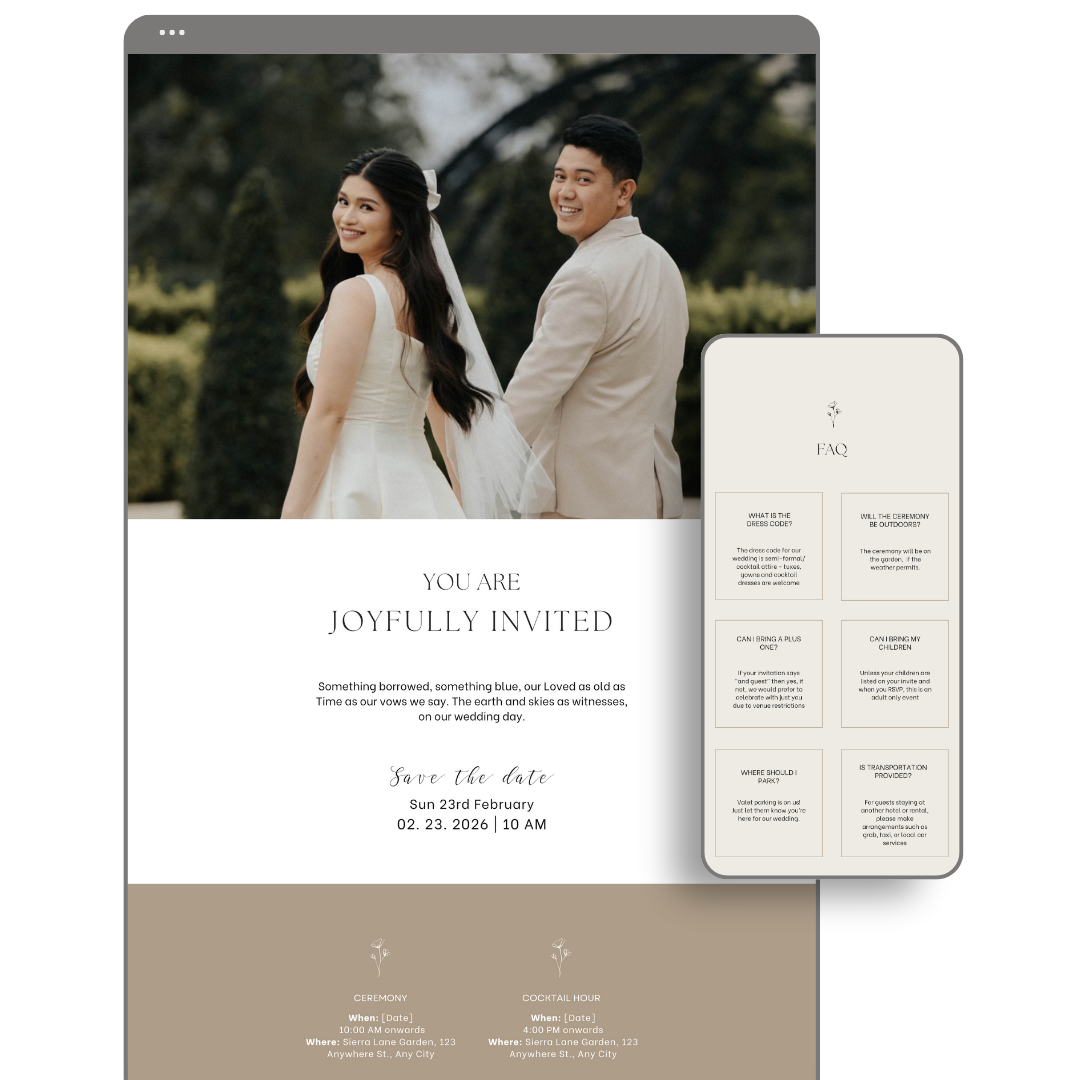
The website should look attractive, but usability matters more than elaborate design.
Keep Navigation Simple
Use clear page names such as Schedule, Travel and RSVP. Creative labels can make information harder to find.
Make It Mobile-Friendly
Most guests will open the site on a phone, often while travelling. Test every page on a small screen.
Use Readable Fonts
Decorative script fonts work best for names and headings. Use a clean font for schedules, addresses and longer text.
Check Colour Contrast
Pale text on a light background may look elegant but can be difficult to read. Important details should have strong contrast.
Keep Important Details in Text
Do not place the schedule or address only inside an image. Text is easier to copy, search and read with accessibility tools.
Add Direct Map Links
Venue addresses should open easily in a map application. Check that the pin leads to the correct entrance rather than only the general property.
Privacy and Security
Wedding websites often contain personal information, so consider who should be able to view it.
Useful privacy options include:
- Password protection
- Hiding the site from search engines
- Limiting RSVP access by guest name
- Removing personal phone numbers
- Avoiding private home addresses
- Publishing detailed venue information only after login
A password may be especially useful for small weddings, private venues or events involving public-facing guests.
Wedding Website Mistakes to Avoid
Common problems include:
- Missing addresses
- Outdated schedule information
- No RSVP deadline
- Unclear plus-one rules
- Too much personal text
- Difficult mobile navigation
- Broken registry links
- Tiny or decorative fonts
- Listing events not open to every guest
- Forgetting to update changes
- Publishing private information publicly
Ask someone unfamiliar with the plans to test the site. They may notice missing details that seem obvious to the couple.
When Should You Create a Wedding Website?
Create the basic website before sending save-the-dates. At minimum, it should include the names, wedding date, location and travel guidance.
Additional pages can be completed gradually:
- Before save-the-dates: Home, date and general location
- Six to nine months before: Travel and accommodation
- Before invitations: Schedule, registry and FAQ
- When invitations are sent: RSVP page
- One month before: Final transportation and timing updates
- After the wedding: Photographs and thank-you message
Update the site whenever important plans change.
Final Wedding Website Checklist
Before sharing the link, confirm that the website includes:
- Correct names and wedding date
- Ceremony and reception addresses
- Start times
- Dress code
- RSVP deadline
- Travel information
- Accommodation options
- Registry details
- Plus-one and children policies
- Dietary request field
- Mobile-friendly design
- Working links
- Appropriate privacy settings
- Contact information
- Current schedule
Make the Website Useful First
The best wedding website examples may look beautiful, but their real value is making the celebration easier for guests to attend.
Start with the questions guests are most likely to ask: where to go, when to arrive, what to wear and how to RSVP. Add personal stories and photographs after the essential information is complete.






Leave a Reply